Home
Blog
Oppora's Claude MCP is Live. Connect our Email Database & Outreach features with any tool to build smart automations inside Claude. Start for Free
Home
Blog
Stephen Parker
Published May 6, 2026
10 min
Try Oppora AI
Create Self-Running Agentic Sales Workflows like N8N just by chatting with AI
Get Started for FREE
Sending bulk emails today isn’t just about writing a good message and hitting send.
If you’ve noticed emails landing in spam or getting ignored, there’s a high chance you’re not fully aligned with Google bulk email guidelines.
Gmail has quietly tightened its rules, and what worked even a year ago can now hurt your deliverability.
In this guide, you’ll get a clear, practical breakdown of what actually matters so you can stay compliant and keep your emails landing in the inbox:
Let’s start by understanding what these guidelines actually mean in today’s sending environment.
At first glance, Google bulk email guidelines might seem like a technical checklist.
But in reality, they reflect a bigger shift in how Gmail evaluates every email you send.
Google is no longer just checking if your email is delivered. It’s judging whether your emails deserve to be in the inbox based on trust, behavior, and user interaction.
That means the google bulk email senders guidelines are not only about authentication or compliance anymore. They are about proving that your emails are wanted.
If your emails get ignored, marked as spam, or never replied to, Gmail sees that as a negative signal.
On the other hand, replies, clicks, and real conversations tell Google that your emails are valuable.
So today, following these guidelines means balancing two things at once:
And if you miss either side, your deliverability starts slipping without any clear warning.
Now that you understand how Gmail evaluates emails, the next step is getting the fundamentals right.
These are the core rules within Google bulk email guidelines you simply can’t ignore if you want consistent inbox placement.
Before anything else, Gmail checks if it can trust you.
SPF, DKIM, and DMARC confirm your emails are actually coming from your domain and haven’t been altered.
Without proper authentication, your emails can be flagged or blocked entirely.
And under current google bulk email senders guidelines, DMARC is no longer optional for bulk senders.
Gmail pays close attention to how users react to your emails.
If too many people mark them as spam, your sender reputation drops fast.
You need to keep complaint rates below roughly 0.3% to stay safe.
Suggested Reading:
Best AI Tools to Avoid Spam Filters in Cold Email OutreachUsers should be able to opt out without friction.
That’s why one-click unsubscribe is now required in Google bulk email guidelines.
You also need to process these requests quickly, usually within two days.
Gmail expects consistency across your sender identity.
Your “From” address, domain, and authentication records should all match clearly.
If they don’t align, it creates trust issues and increases your chances of landing in spam.
Even if you follow every technical rule, your emails can still miss the inbox.
That’s because Google bulk email guidelines don’t clearly explain how Gmail evaluates real user behavior.
These hidden signals quietly decide whether your emails land in inbox, promotions, or spam.
Opens might look good in reports, but they don’t carry much weight anymore.
Replies, on the other hand, are a strong trust signal.
Gmail sees replies as real conversations, which tells the system your emails are relevant.
Your domain builds a reputation over time based on how you send emails.
Every campaign adds to that history, whether good or bad.
Gmail looks beyond delivery and tracks what users actually do.
It evaluates engagement signals to decide future placement.
Avoiding spam words is no longer enough to stay safe.
Gmail now focuses on whether your content feels useful and human.
By now, the rules might seem clear.
But most deliverability issues don’t come from ignorance, they come from small mistakes that compound over time.
Even if you understand Google bulk email guidelines, breaking them often happens in execution.
This is one of the fastest ways to damage your sender reputation.
If your list contains outdated, scraped, or irrelevant contacts, Gmail picks it up quickly.
Sudden spikes in sending volume raise immediate red flags.
Gmail expects gradual and consistent sending behavior, not aggressive jumps.
Even technically perfect emails fail if they don’t connect with the reader.
When your message feels mass-produced, people ignore it.
Many senders focus only on sending, not on what happens after.
But Gmail values ongoing conversations more than one-way outreach.
Staying compliant with google bulk email senders guidelines isn’t just about setup.
It’s about consistently sending the right emails to the right people, at the right pace.
Understanding Google bulk email guidelines is one thing.
But staying compliant consistently comes down to having a clear workflow you can follow every time you send emails.
Here’s how you can structure your process so your emails stay inbox-ready as you scale.
Everything starts with your prospect list quality.
If your data is weak, no strategy will save your deliverability.
Your technical foundation needs to be solid before you send anything.
This is where most senders overlook critical setup steps.
Jumping straight into high-volume sending is risky.
Gmail expects gradual and natural behavior from new senders.
Suggested Reading:
10 Email Warm Up Tools That Fix Deliverability Issues FastDeliverability today depends heavily on how people interact with your emails.
So your content needs to invite action, not just deliver information.
Even with the right setup, you need to keep tracking performance.
This is how you stay aligned with google bulk email senders guidelines over time.
When you follow this workflow, compliance becomes part of your process, not something you worry about later.
Now that you have a workflow in place, the challenge becomes execution at scale.
This is where most senders struggle to consistently follow Google bulk email guidelines without breaking something along the way.
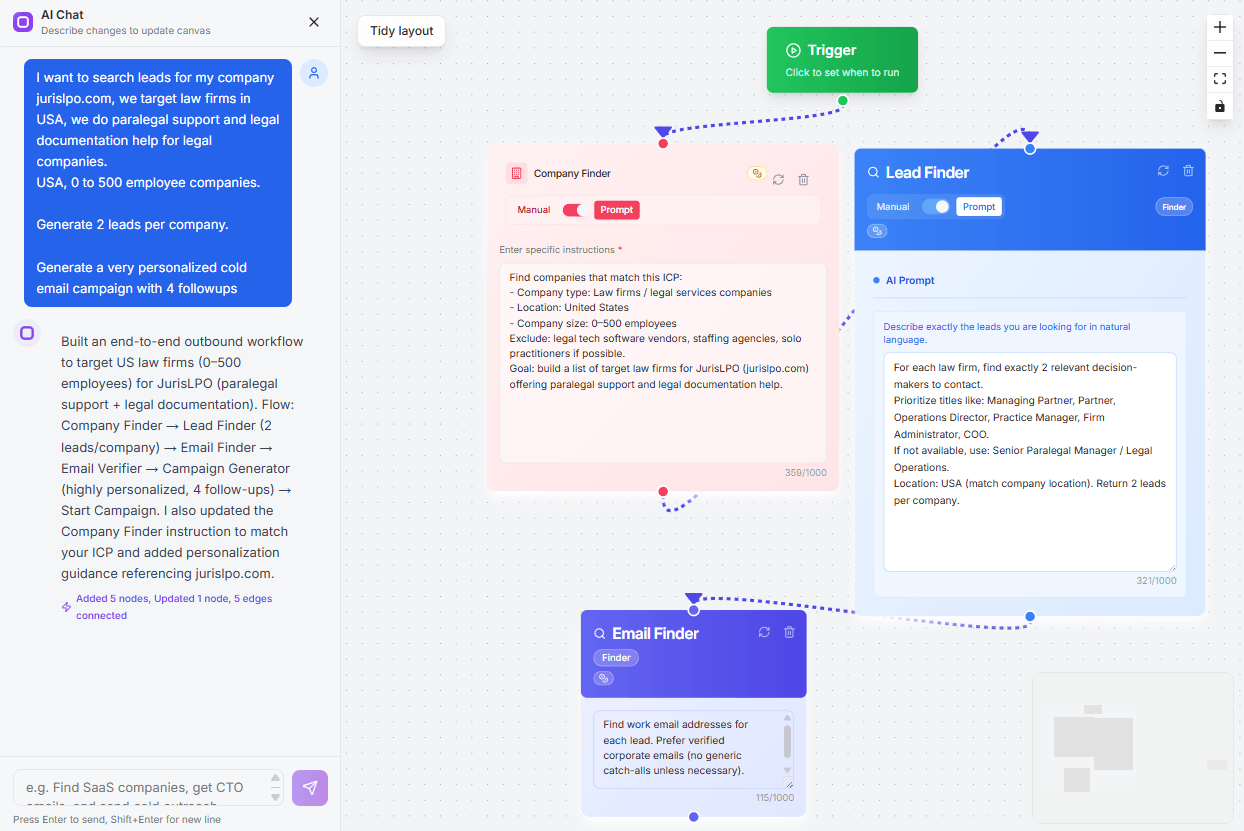
Tools like Oppora.ai help by turning these best practices into an automated system instead of manual effort.
List quality is the foundation of deliverability, but maintaining it manually is time-consuming.
Oppora.ai pulls from large verified data sources and validates contacts before you even start outreach.
Domain alignment is a key trust signal for Gmail.
Oppora automatically matches sender identity based on the recipient’s mail provider.
Scaling too fast is one of the biggest risks in email outreach.
Oppora helps you grow volume without damaging your sender reputation.
Generic emails hurt engagement and deliverability.
Oppora.ai generates unique, context-aware emails instead of repeating templates.
Gmail values conversations more than one-way messages.
Oppora’s AI can handle replies with its AI reply agent and keep conversations active without manual effort.
When your system handles these steps consistently, staying compliant with Google’s guidelines becomes much easier and more predictable.
Once your basics and workflow are in place, the next step is staying ahead.
Because Google bulk email guidelines aren’t static, Gmail keeps evolving how it filters and ranks emails.
These advanced strategies help you maintain strong deliverability even as you scale.
Relying on a single domain for all your outreach creates risk.
If that domain’s reputation drops, your entire email system gets affected.
Suggested Reading:
Primary Domain vs Cold Email Domain: What You Need to KnowGmail prefers predictability over sudden spikes.
Your sending behavior should look natural and stable.
Sending more emails doesn’t mean better results anymore.
In fact, low engagement at high volume can hurt your deliverability fast.
Your email list is never static.
Over time, data becomes outdated, which directly impacts performance.
When you combine these strategies with google bulk email senders guidelines, you create a system that not only stays compliant but keeps improving over time.
Following Google bulk email guidelines is no longer just about technical setup.
It’s about building a system that earns trust through consistent sending and real engagement.
Gmail now rewards emails that get replies, clicks, and meaningful interaction, not just high volume.
If your emails feel relevant and timely, deliverability improves naturally over time.
But if they get ignored, even a perfect setup won’t help you for long.
So focus on clean data, steady sending patterns, and conversations instead of just campaigns.
If managing all of this feels complex, tools like Oppora.ai can help you bring everything into one workflow from verified leads to outreach and replies so staying aligned with google bulk email sender guidelines becomes much easier to maintain.
Google bulk email guidelines are rules set by Gmail for bulk senders that define how you should authenticate emails, manage user consent, and maintain engagement, so your emails are trusted and consistently delivered to the inbox instead of spam.
If you ignore these guidelines, Gmail starts treating your emails as low trust, which leads to lower inbox placement, higher spam filtering, and a gradual drop in your domain reputation that becomes difficult to recover.
Yes, authentication using SPF, DKIM, and DMARC is mandatory for bulk sending because it proves your identity as a sender and helps Gmail verify that your emails are legitimate and not spoofed.
Engagement matters more because Gmail evaluates how recipients interact with your emails, so higher replies and clicks improve deliverability while sending more emails without interaction actually works against you.
To stay compliant at scale, you need a process that combines clean data, gradual sending, and continuous engagement tracking, and using a system like Oppora can help you manage these moving parts together without relying on manual effort.
Summarize with AI
Share